- Context is copied between tools
- Approvals depend on manual follow-up
- Knowledge stays buried in files and chats
- Leadership sees work after the delay
One company. One intelligent command layer.
The AI Operating System That Connects Your Entire Business.
NerveHQ brings your software, company knowledge, teams, and specialized AI agents into one governed operating environment—so people can move from a goal to coordinated work, visible progress, and better decisions without switching between disconnected tools.
- Any system
- Any API
- Controlled permissions
- Credentials never exposed to agents
NerveHQCommand Center
From fragmentation to flow
Your company already has the systems. NerveHQ makes them operate together.
Connecting steps is only part of the job. NerveHQ gives people specialized agents, governed company context, visible execution, and a shared command center for the work itself.
- Approved context reaches the right agent
- Ownership and review points stay visible
- Business memory remains useful across work
- Results include clear next actions
Universal Connection Gateway
Connect NerveHQ to the software your company already uses.
NerveHQ is not limited to a fixed integration catalog. Its Universal Connection Gateway can connect AI agents to any software, platform, service, or internal system with an accessible API or controlled connector path.
- 01Software, platforms, APIs, files, and company systems
- 02Universal Connection Gateway
- 03Credentials, workspace permissions, and policy controls
- 04Specialized agents, workflows, reports, and actions
Governed on every request
Connection governance stays between the agent and every system.
- Credentials are encrypted and injected only inside the server-side Gateway.
- Credentials are never included in agent prompts or environments.
- User, workspace, agent, and connection authorization is rechecked for each request.
- Connections can be disabled or revoked centrally.
ERP and business
Odoo
SAP
Oracle NetSuite
Microsoft Dynamics 365
CRM and sales
Salesforce
HubSpot
Zoho
Communication and productivity
Google Workspace
Microsoft 365
Slack
Microsoft Teams
WhatsApp
Knowledge and files
Notion
Dropbox
Commerce and support
Shopify
WooCommerce
Zendesk
Jira
REST APIGraphQLCustom API
Examples of platforms NerveHQ can be configured to connect with. Availability depends on API access, customer permissions, and deployment requirements.
How it works
People stay in command. AI agents move the work forward.
NerveHQ gives every team one understandable operating loop—from assigning work to reviewing the result.
Enter the right team workspace
Keep each department’s agents, context, tools, and work history together.
Choose a specialized AI agent
Work with an agent configured for the responsibility, knowledge, and permissions required.
Give it a task or goal
Add the approved files and context, then choose the appropriate execution controls.
Follow progress and act
Review the live run, output, ownership, and history before moving the result into action.
Inside NerveHQ
This is where people and AI agents get work done.
A real command center for choosing specialized agents, assigning goals and tasks, following execution, and keeping work history visible across the company.
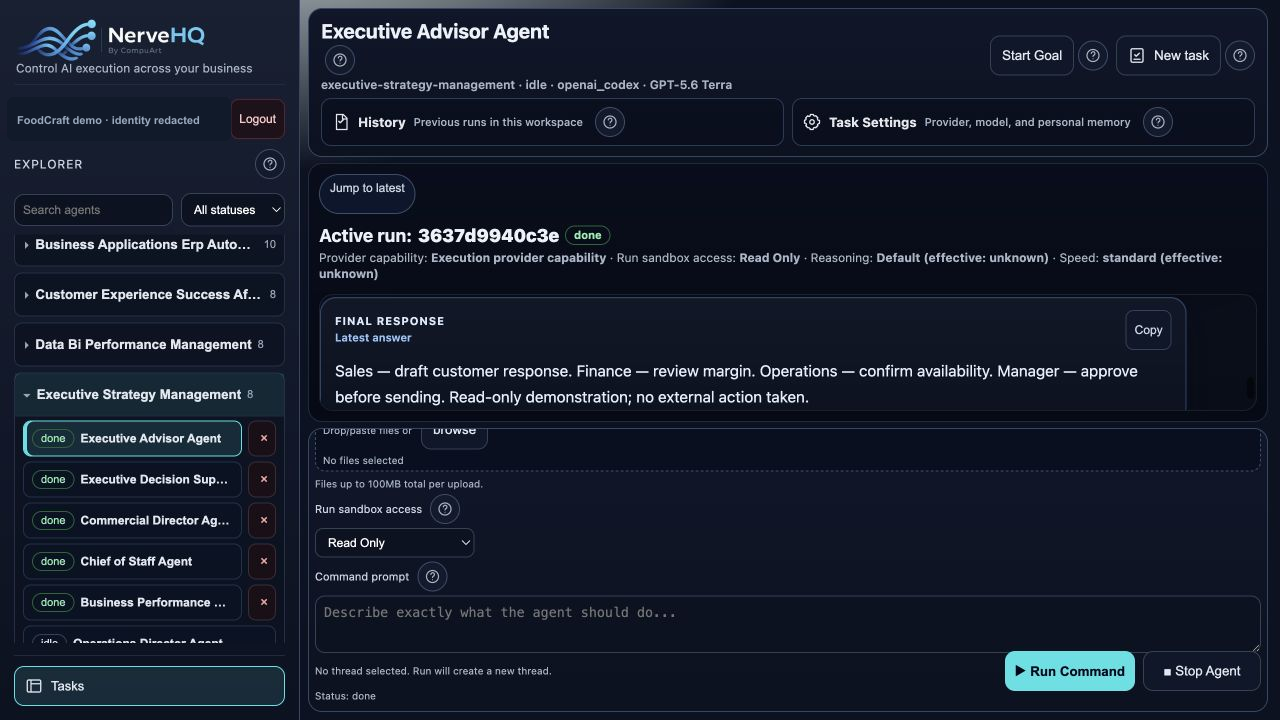
Team workspaces
Keep each department’s agents, context, tools, and work together.
Specialized agents
Choose the right AI agent for the responsibility in front of you.
Goals and tasks
Assign outcomes, attach approved files, and control execution from one surface.
Visible history
Follow run status and return to previous work without losing operational context.
Workflow evidence
See what is implemented, what is demonstrated, and what will be measured.
Every evidence page states its controls, limitations, and measurement plan instead of turning a product example into an unsupported customer result.
Illustrative workflow
One commercial request. The right context, reviewers, and next action.
This example shows the operating model—not a customer result or guaranteed automation path.
- 01
Sales request
A quotation request enters the Sales workspace with its original context.
- 02
Approved context
The Gateway retrieves only the CRM, stock, and account data allowed for this task.
- 03
Specialist review
Sales, finance, and operations agents prepare their part within separate scopes.
- 04
Human decision
A manager reviews the recommendation where commercial authority is required.
- 05
Visible outcome
The briefing, ownership, next action, and run history remain available.
Core platform
More than a model. An operating environment for responsible AI work.
NerveHQ combines the controls, context, and work surfaces needed to move AI from isolated prompts into daily operations.
Specialized agents
Configure agents around real department responsibilities and operating boundaries.
Team workspaces
Separate departmental context while sharing only the memory and tools that are approved.
Business memory
Use shared and personal context with reviewed learning for repeatable work.
Goals and task history
Keep persistent runs, outputs, events, files, and follow-through together.
Model and provider choice
Choose the provider, model, reasoning, and advisory or execution mode appropriate to the task.
Sandbox controls
Bound the environment and level of execution available to each agent and workspace.
Security and governance
Control is part of the architecture, not an afterthought.
NerveHQ keeps identity, workspace scope, connections, and execution policy visible as work moves across systems.
Role-based access
Define what users and administrators can see and manage.
Workspace isolation
Keep each team’s context and tools within its assigned boundary.
Server-side credentials
Keep connected-system secrets outside agent prompts and environments.
Per-request authorization
Recheck the user, workspace, agent, and connection before access.
Controlled execution
Use advisory, sandboxed, and approved execution paths according to risk.
Auditability and revocation
Review activity and disable a connection centrally when needed.
Use cases
Put specialized AI agents to work where your teams lose the most time.
NerveHQ can support work across departments while keeping the relevant systems, knowledge, permissions, and accountable people connected.
01
AI Agents for Sales Teams
Coordinate sales requests, customer context, quotations, follow-ups, and pipeline visibility through governed AI agents.
Explore use case02AI Operating System for Odoo
Keep Odoo as the system of record while NerveHQ connects it to specialized agents and other approved systems.
Explore use case03Executive AI Command Center
Give leadership a governed command center for priorities, operational context, recommendations, and accountable follow-through.
Explore use case04Business Workflow Automation with AI Agents
Use the Universal Connection Gateway as the governed connection layer for workflows spanning departments and applications.
Explore use case05AI Agents for Finance and Operations
Coordinate finance, inventory, approvals, operations, and management reporting with governed specialist agents.
Explore use caseImplementation path
Prove one controlled workflow, then expand deliberately.
Discovery
Define the business outcome, owners, systems, and risk boundaries.
Controlled connection
Configure API access, connection scope, and credential handling.
Workspace and agent design
Set roles, context, memory, tools, and review points.
Validation and rollout
Test with safe data, review the trace, and expand only after approval.
Buyer guides
Evaluate the operating model before you buy the technology.
Practical guidance for comparing AI approaches, connecting Odoo, and assessing an enterprise agent platform.
AI Chatbot vs AI Operating System
Understand the difference between answering prompts and coordinating governed work across teams and systems.
Read guideOdoo AI Integration Guide
Learn how Odoo can participate in governed AI workflows with CRM, communications, documents, commerce, and internal APIs.
Read guideEnterprise AI Agent Platform
Evaluate the operating environment, connector architecture, permissions, memory, visibility, and controls enterprise agents require.
Read guideFrequently asked questions
The practical questions teams ask first.
What is an AI operating system for business?
It is a governed operating layer that connects company software, teams, knowledge, and workflows so specialized AI agents can coordinate real work across departments.
How is NerveHQ different from an AI chatbot?
A chatbot mainly responds to prompts. NerveHQ adds persistent workspaces, specialist agents, approved business context, controlled execution, run history, and visibility across connected systems.
Can NerveHQ connect to our existing software?
Yes. NerveHQ can be configured to connect with software, platforms, services, files, and internal systems that provide an accessible API or an implementable controlled connector path. Availability depends on API access, customer permissions, and deployment requirements.
Does NerveHQ expose system credentials to AI agents?
No. Credentials are encrypted and injected only inside the server-side Universal Connection Gateway. They are not included in agent prompts or environments, and authorization is rechecked for every request.
Is every connection a one-click integration?
No. Some connections can use a ready connector, while others require API configuration, permission mapping, or a controlled custom connector based on the software and deployment requirements.
How does NerveHQ work with company data?
Agents use only the context and tools approved for their user, workspace, role, and connection. NerveHQ can summarize, prepare recommendations, route work, and support controlled actions while keeping the work visible.
Can NerveHQ be deployed privately?
Private deployment options are available and are scoped during discovery according to the systems, data boundaries, and operating requirements of each company.
Request a guided walkthrough
See how your people can run work with AI from one place.
We’ll show how NerveHQ brings your company systems, knowledge, teams, and specialized agents into one governed command center—then demonstrate how people assign work, follow progress, and move results into action.
Prefer email? nervehq@compuartstore.com